---
title: How to work with external notes in Kiroku
description: If you have notes which were not created in Kiroku, you can import these to use with any of Kiroku's features. This can be particularly useful for generating Docs.
---
[Skip to content](https://help.trykiroku.com/working-with-external-notes#main-content)
English
Show submenu for translations
[Contact Us](https://help.trykiroku.com/kb-tickets/new)
[](https://editor.trykiroku.com/login)
Open main navigation
Close main navigation
- English
Show submenu for translations
- [Contact Us](https://help.trykiroku.com/kb-tickets/new)
- [Contact us](https://help.trykiroku.com/kb-tickets/new)
[Contact us](https://help.trykiroku.com/kb-tickets/new)
Welcome to Kiroku's Help Centre!
- There are no suggestions because the search field is empty.
1. [Kiroku Help](https://help.trykiroku.com/)
2. [Note templates & appointments](https://help.trykiroku.com/note-templates-appointments)
3. [Creating Notes](https://help.trykiroku.com/note-templates-appointments#creating-notes)
# How to work with external notes in Kiroku
## Find out how to import and work with notes that have not been created in Kiroku
If you have notes which were not created in Kiroku, you can import these to use with any of Kiroku's features. This can be particularly useful for generating Docs.
### How to import your notes
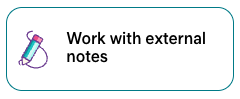
1. Go to your [notes dashboard](https://editor.trykiroku.com/), and select the '**Work with external notes**' button found in the middle of the top row of templates.
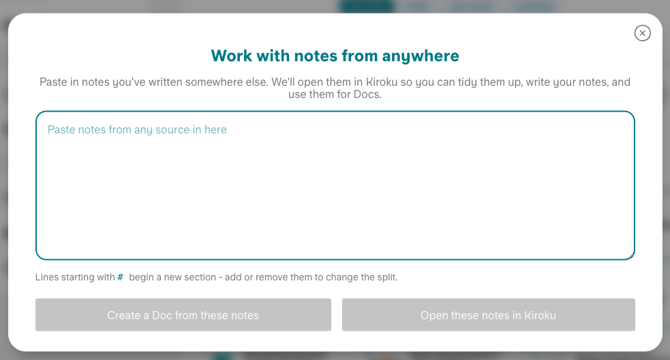
2. Paste your notes into the text box
3. The note sections should be automatically detected. Lines starting with # begin a new section. Add or remove # to adjust your sections.
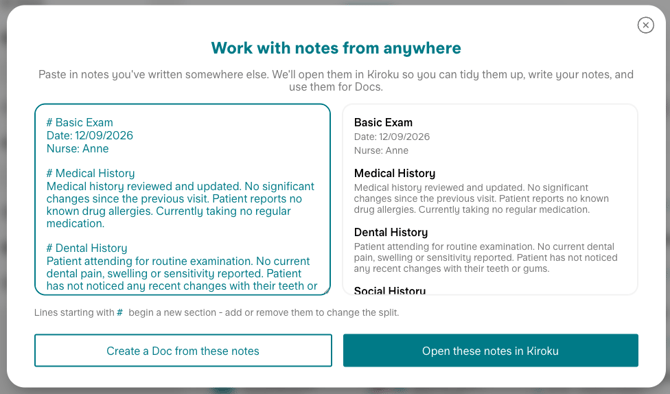
4. Choose if you would like to:
A) **Create a Doc from these notes** - you then select the Doc template you'd like to use
B) **Open these notes in Kiroku** - the note will then be converted to a Kiroku note, with which you can use any features (including then generating a Doc).
Converted notes can be found in the '[Drafts](https://editor.trykiroku.com/?tab=drafts)' section of your notes dashboard.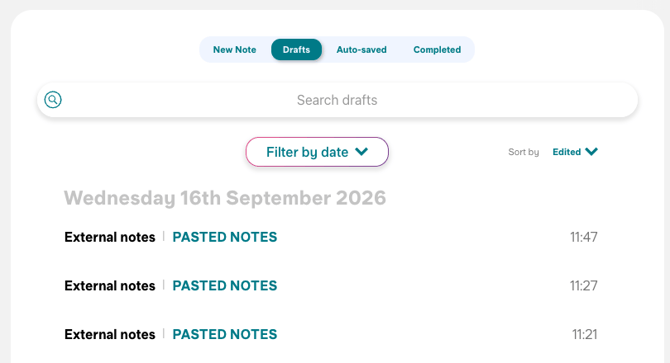
- [Getting started](https://help.trykiroku.com/getting-started#main-content)
- [FAQs](https://help.trykiroku.com/getting-started#faqs)
- [Kiroku Templates](https://help.trykiroku.com/getting-started#kiroku-templates)
- [Note templates & appointments](https://help.trykiroku.com/note-templates-appointments#main-content)
- [Creating Notes](https://help.trykiroku.com/note-templates-appointments#creating-notes)
- [Editing Note Templates](https://help.trykiroku.com/note-templates-appointments#editing-note-templates)
- [Note FAQs](https://help.trykiroku.com/note-templates-appointments#note-faqs)
- [AI Notes Features](https://help.trykiroku.com/note-templates-appointments#ai-notes-features)
- [Docs](https://help.trykiroku.com/docs#main-content)
- [Using Docs](https://help.trykiroku.com/docs#using-docs)
- [Creating and Editing Doc Templates](https://help.trykiroku.com/docs#creating-and-editing-doc-templates)
- [Docs FAQs](https://help.trykiroku.com/docs#docs-faqs)
- [Account](https://help.trykiroku.com/account#main-content)
- [Account FAQs](https://help.trykiroku.com/account#account-faqs)
- [Your Subscription](https://help.trykiroku.com/account#your-subscription)
- [FAQs](https://help.trykiroku.com/faqs#main-content)
- [Kiroku Features](https://help.trykiroku.com/faqs#kiroku-features)
- [Troubleshooting](https://help.trykiroku.com/troubleshooting)
[](https://trykiroku.com/)
**Contact us:
Chat** is found at the bottom right of your screen on the website or when logged in
You can email us at **support@trykiroku.com**
To **WhatsApp** us scan the code below:

[mailto:Support@trykiroku.com](mailto:Support@trykiroku.com)
Copyright © 2026, Kiroku Limited
Registered Office: 20 Wenlock Road, London, England, N1 7GU
Registered Number: 10775183 in England & Wales.

```json
{
"@context" : "https://schema.org",
"@type" : "VideoObject",
"caption" : {
"@type" : "MediaObject",
"contentUrl" : "https://help.trykiroku.com/media-transcripts/472952675551/en.vtt",
"inLanguage" : "en",
"name" : "en Captions"
},
"contentUrl" : "https://27154554.fs1.hubspotusercontent-eu1.net/hubfs/27154554/video_assets/472952675551/inherited/web_optimized.mp4",
"dateModified" : "2026-09-16T13:01:03.056Z",
"duration" : "PT1M26S",
"height" : 994,
"name" : "ExternalNotes2",
"thumbnailUrl" : "https://27154554.fs1.hubspotusercontent-eu1.net/hubfs/27154554/Video%20Clips/ExternalNotes2/ExternalNotes2.mp4/medium.jpg",
"uploadDate" : "2026-09-16T13:01:01.831Z",
"width" : 1920
}
```